2012年11月22日 星期四

[aspx]HttpUtility.UrlDecode 與 Server.UrlDecode 真的不一樣

我以為我經過上次的錯誤,中文亂碼可以不會再出現在我的生活中。

直到我的膝蓋中了一箭。 (這裡)

找了一陣子,原來有人,以前的程式碼用了Server.UrlDecode

HttpUtility.UrlDecode 與 Server.UrlDecode 真的不一樣。

我寫了以下的程式來證明:

Function WriteOutput(ByVal str As String) As String
    Response.AppendHeader("Content-Type", "text/html;charset=UTF-8")
    Dim bs As Byte() = System.Text.Encoding.UTF8.GetBytes(str)
    Response.ContentEncoding = System.Text.Encoding.UTF8
    Response.OutputStream.Write(bs, 0, bs.Length)
    Return "OK"
End Function
Protected Sub Page_Load(ByVal sender As Object, ByVal e As System.EventArgs)
    WriteOutput("System.Text.Encoding.Default.EncodingName:" + System.Text.Encoding.Default.EncodingName + "<br/>")
    WriteOutput("System.Text.Encoding.Default.WebName:" + System.Text.Encoding.Default.WebName + "<br/>")
    WriteOutput("HttpUtility.UrlDecode:" + HttpUtility.UrlDecode("%e4%b8%ad") + "<br/>")
    WriteOutput("Server.UrlDecode:" + Server.UrlDecode("%e4%b8%ad") + "<br/>")
End Sub

結果這就是不一樣:

image

附帶說明一下,這個現象不一定會在你的伺服器出現。在我的開發環境,如下。

image

我現在還找不到確切指出設定不同的地方。

我只看到兩個 EncodingName 所出現的字串是不同的。

據網路消息,說 Server.UrlDecode 是用系統編碼。可是我還沒辦法找到如何顯示現在系統編碼。

2012年11月20日 星期二

[aspx]不會用設定,不要怪微軟!(原題:好心的微軟幫了倒忙。中文亂碼解決實錄)

更新:要看最後解法,請直接跳最下面

有史以來解決中文亂碼最長的一次。從我2000年開始,踩進可怕的中文混沌中,
從沒有這麼令人生氣的一次了。

原因就是微軟幫倒忙!微軟好心幫忙但是我還是得告訴它我的 charset。

「絕聖棄智,民利百倍。絕仁棄義,民復孝慈。絕巧棄利,盜賊無有。」--老子

故事是這樣開始的。要求是:
「我需要用 post 方法,傳送一筆記錄的資料,而網頁伺服器接到之後,幫忙下 SQL 插入資料。」

你看多簡單的一句話!結果發生亂碼,沒關係,那我就寫個測試的程式,看是傳過去的字就亂了,還是 SQL 執行完才錯。

好,簡化過的發送端程式如下:

Function SendPutRequest(ByVal keyname As String, ByVal keyvalue As String)
    Dim uristr As String = "http://localhost:1490/WebSite1/poid_fail.aspx"
    Dim req As System.Net.HttpWebRequest = System.Net.HttpWebRequest.Create(uristr)
    req.Method = "POST"

    Dim param As String = "a=put"
    param += "&" & "key" & "=" & keyname
    param += "&" & "value" & "=" & keyvalue
    Dim bs As Byte() = Encoding.UTF8.GetBytes(param)
    req.ContentType = "application/x-www-form-urlencoded"
    req.ContentLength = bs.Length

    Using reqStream As System.IO.Stream = req.GetRequestStream()
        reqStream.Write(bs, 0, bs.Length)
    End Using
    Using wr As System.Net.WebResponse = req.GetResponse()
        Dim rs(wr.ContentLength) As Byte
        Dim expectcount As Integer = wr.ContentLength
        Dim readcount As Integer = 0
        Response.ContentEncoding = System.Text.Encoding.UTF8
        readcount += wr.GetResponseStream().Read(rs, 0, wr.ContentLength)
        Response.Write(Encoding.UTF8.GetChars(rs))
    End Using
    Return "OK"
End Function

Protected Sub Page_Load(ByVal sender As Object, ByVal e As System.EventArgs)
    SendPutRequest("DataName", "中文測試")
End Sub

發送端,就只是一個假裝用 form 打出資料的 request。其中也很簡單的一個 keyname 跟 keyvalue,傳送至伺服端

而,接收端程式(簡化版)很快就寫好了:

<%@ Page Language="VB" %>

<%@ Import Namespace="System.Data" %>
<%@ Import Namespace="System.Data.OleDb" %>

<script runat="server">
    Protected Sub Page_Load(ByVal sender As Object, ByVal e As System.EventArgs)
        Dim act As String
        Dim insertSql As String = ""
        Try
            act = Request.Form("a")
            If act = "put" Then
                Dim keyname As String
                keyname = Request.Form("key")
                Dim keyvalue As String
                keyvalue = Request.Form("value")
                insertSql = "insert into [poidata] ($columns$) values ($values$)"
                insertSql = insertSql.Replace("$columns$", keyname).Replace("$values$", keyvalue)
                ExecuteSql(insertSql)
            End If
        Catch ex As Exception
            insertSql = ex.Message
        End Try
        Dim contentbody As String = insertSql
        Response.AppendHeader("Content-Type", "text/json")
        Response.ContentEncoding = System.Text.Encoding.UTF8
        Response.OutputStream.Write(Encoding.UTF8.GetBytes(contentbody), 0, System.Text.Encoding.UTF8.GetByteCount(contentbody))
    End Sub
</script>

在開發環境很正常。發送端與接收端都是在同一個電腦上,沒有問題。

image 

把接收端程式丟到真的伺服器去,就變亂碼!:

image

好。很正常的,因為值有中文,沒有 encode 所以變亂碼,我可以接受。
而我還特別把接收端的程式的 response,以 Encoding.UTF8.GetBytes 轉成 byte,然後用 write byte 方式,這是最保險,照字串byte回傳回來的保險方式。

那我 encode 吧。

把傳送端 encode。

param += "&" & "key" & "=" & HttpUtility.UrlEncode(keyname)

param += "&" & "value" & "=" & HttpUtility.UrlEncode(keyvalue)

結果長一模一樣。奇怪了。

image

那我接收端 decode 看看,結果一樣。

那來檢查兩邊的 default encoding 好了。
把接收端的 default encoding 回傳回來看看。

Dim contentbody As String = insertSql + "<br />" + System.Text.Encoding.Default.EncodingName

在開發環境,看起來是這樣
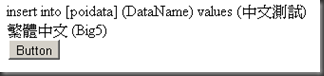
image

把程式丟到真的伺服器上,嗯,都是 big5 啊!

image

啊,等等,不對勁耶,為什麼真的伺服器不是寫「繁體中文 (Big5)」傳回來,而是用「Chinese Traditional (Big5)」這是搞什麼鬼?

後來,同事看我搞很久,決定傳授我妙方。
原本,在 IIS 的設定,我是使用虛擬目錄的方式,指到網站程式所放的目錄。
而他的經驗是,在 IIS 上,指定用「網路應用程式」
他也幫我弄好了。只是,網路位址會移動,而我,只是改別人的程式,不太想去改位址這種事。
如果,只想研究到這裡的人,就去改成「網路應用程式」試試吧。

因為沒辦法、因為不死心,我決定來試試強迫接到 encode 過的字串為目標,
想確定傳過去的 byte 沒有變動。
所以,接收端先不 decode,就接到什麼回寫什麼看看。
再來,因為傳送端我 encode 一次不夠,我再多 encode 一次看看。

param += "&" & "value" & "=" & HttpUtility.UrlEncode(HttpUtility.UrlEncode(keyvalue))

很賭氣的作法。UrlEncode 這種 encode 法,作兩次 encode,要得回原來的字,就要 decode 兩次。只要我拿到不是亂碼的字串,算清楚encode次數,就知道是不是 byte 被動到了。

image

很好,這是好的開始,這看來像是 encode 一次的字串。
那我接收端,就 decode 一次試試。

keyvalue = HttpUtility.UrlDecode(Request.Form("value"))

image

耶,看來好了。

而實際把組好的 SQL 字串執行下去,資料庫裡,也就正常的中文了。

回頭討論,我的傳送端 encode 兩次,我的接收端 decode 一次。
這代表,有某個地方幫我 decode 一次。而且在我的程式執行之前。
按照我的推斷,那一次的 decode 的時候,參考不知道哪裡的編碼,在那裡字串亂掉了。
明明就看不懂中文,還硬要轉,當然就搞亂了。
這從 default encoding name 可以看得出來,雖然都是 Big5,但是一個用中文表示,一個用英文表示,明白的指出,兩個的執行環境是不同的,而這個執行環境的不同,就會導致亂碼。
而我,用兩次 encode,讓我的字串被自動 decode (也就是第一次,不是我的程式做的) 之後,成為 encode 一次的狀態,這時是 ascii 的字串表示式,用這個字串,讓我的程式來 decode 回 .net 裡面的字串。由於資訊保持完整,所以可以完美地解回 .net 字串。問題才得以解決。
確切幫忙 decode 一次的程式我沒有找到,不過應該不脫離 iis,asp .net 這個範圍。
所以這次幫倒忙就算在微軟的頭上!

我想也許會有高手更了解 IIS 或 asp .net 的可以用更漂亮的方式解決這問題吧?
我的確是不了解所以硬幹啊。

更新:

因為無可避免地會被 decode 一次,所以指定正確 charset 一定是正解。指定的方式即在 request 的 Content-Type 裡。如下:

req.ContentType = "application/x-www-form-urlencoded;charset=UTF-8"

接收端程式,不用需 decode,微軟會按指定編碼幫你搞定。

它就是要幫你解,你只好一定要告訴他怎麼解。

2012年10月29日 星期一

[asp]使用VS2008,怎麼對 asp debug

如果使用VS2008,若直接對 asp 按下 debug,會出現

image

經過搜尋,解決方法是,

(1)設定iis,使得該頁可以直接使用。

image

(2)打開VS2008,開啟網站(檔案->開啟->網站),選擇網站所在的目錄

image

(3)附加至處理序(偵錯->附加至處理序),選擇 w3wp.exe (適用於 iis 6)

image

按下附加之後,VS2008,就會進入偵錯模式。

(4)瀏覽器跑一下 asp 網頁,方案總管會出現指令碼文件。

image

(5)雙擊 asp 文件,打開文件後,即可設中斷點,開始正式 debug。

image


結尾:

美中不足,不能邊改邊debug,你可以看到這文件是唯讀的。

[asp] 最近又用到 asp,幾個筆記需要記

判斷 access 資料庫某個欄位值為 null

我以為用 if cursor.fields(i).value = null then…可以判斷。我錯了。

要用 if isnull(cursor.fields(i).value) then … 才行。


到底權限怎麼開才能寫入?

首先,我的 os 是 windows 7,iis是 7 (應該吧…)

如果是 asp .net 的程式,IIS_USRS 這個使用者要開啟權限到寫入。

如果是 asp 的程式,IUSR 這個使用者要開啟權限到寫入。


如何存取utf-8 編碼的文字檔內容?

asp 直接 openTextFile 是不對的。它會按執行環境的預設值讀寫檔案。

我有改過CODEPAGE="65001",無效。

目前使用 ADODB.Stream 可。

有人提供小函數使用。

Sub Save2File (sText, sFile)
    Dim oStream
    Set oStream = CreateObject("ADODB.Stream")
    With oStream
        .Open
        .CharSet = "utf-8"
        .WriteText sText
        .SaveToFile sFile, 2
    End With
    Set oStream = Nothing
End Sub

Function ReadUtf8File(sFile)

    Set objStream = CreateObject("ADODB.Stream")
    With objStream
        .Charset = "utf-8"
        .Type=2
        .mode=3
        .Open
        .loadfromfile sFile
        ReadUtf8File=.readtext
        .Close
    End With
    Set objStream = Nothing

End Function

使用 javascript 的 escape 的文字,asp 怎麼解?

我基本上放棄了。試了幾次都不成功。這個問題很大,需要前後程式配合(html, javascript, asp)。因此會另外再寫詳細的文章。

簡單來說,我後來轉用 htmlencode。那 javascript 怎麼做 htmlencode 或 htmldecode?

以下有兩個小函數可以使用

function htmldecode(strHtmlEncode){
    var div =  document.createElement('div');
    div.innerHTML = strHtmlEncode;
    return div.innerText
}

function htmlencode(strHTML)
{
    var div = document.createElement('div');
    div.innerText = strHTML;
    return div.innerHTML;
}

asp 的程式,直接取值就好,不用解。

2012年10月23日 星期二

[html]用 javascript 查詢在網頁裡有多少定義過的 style?

原來,在 document.styleSheets 裡,存放了我們定義過的 style (class)。
也就是在 <style type="text/css"> 或 <link rel="stylesheet" type="text/css" href="src.css"> 這兩類地方寫的 style。

使用 javascript 可以取出內容。

var count = document.styleSheets.length;
    for (var y=0; y < count; y++)
    {
        var classes = document.styleSheets[y].rules || document.styleSheets[y].cssRules
        for(var x=0;x<classes.length;x++) {
            console.log("sheet"+y.toString()+" rule"+x.toString()+":"+classes[x].selectorText+":"+((classes[x].cssText) ? (classes[x].cssText) : (classes[x].style.cssText)));
        }
    }

2012年9月18日 星期二

[plone]plone.app.theming 1.0 升到 1.1a2

據說,plone 4 開始,佈景主題 (theme) 可以使用 diazo 引擎來更換管理佈景主題。要達成這個功能,plone 要安裝 plone.app.theming 模組。令人混亂的是,在 pypi 看到的是 plone.app.theming,在自己安裝好的 plone site 的 add-on 的管理畫面,是看到 Diazo theme support。光是名稱就把我搞掉一天了。

最近的 plone 到4.2.1,只有 *nix 跟 Mac OS 安裝檔。目前 (2012/09/18),windows 的安裝檔是到 4.2,plone.app.theming 是 1.0,它只有選擇已安裝的佈景主題,或手動指定 rules.xml。對於我來說應該夠了,只是看到 pypi 上 1.1 的描述,很想要試,不知該怎辦,我也找了很久…。看著下載下來的 plone.app.theming-1.1a2.zip 不知從何下手。

後來在那個 zip 檔裡,看到 buildout.cfg 裡有一段:

[versions]
plone.app.theming =

那我就來試試吧。

先把 plone 給關了。

image

然後,編輯 c:\plone42\buildout.cfg,加入 plone.app.theming = 1.1a2 在 [versions] 底下。

[versions]
distribute = 0.6.27
plone.app.theming = 1.1a2

然後,就在命令列下, c:\plone42\ 下指令

C:\Plone42>bin\buildout.exe

結果就出現以下的訊息:

C:\Plone42>bin\buildout.exe
Getting distribution for 'plone.app.theming==1.1a2'.
warning: no previously-included files matching '*pyc' found anywhere in distribu
tion
Got plone.app.theming 1.1a2.
Getting distribution for 'plone.resourceeditor'.
Got plone.resourceeditor 1.0b1.
Getting distribution for 'roman==1.4.0'.
Got roman 1.4.0.
Updating zeo.
Created directory C:\Plone42\parts\zeo
Created directory C:\Plone42\parts\zeo\etc
Created directory C:\Plone42\parts\zeo\var
Created directory C:\Plone42\parts\zeo\log
Created directory C:\Plone42\parts\zeo\bin
Wrote file C:\Plone42\parts\zeo\etc\zeo.conf
Wrote file C:\Plone42\parts\zeo\bin\zeoctl
Changed mode for C:\Plone42\parts\zeo\bin\zeoctl to 777
Wrote file C:\Plone42\parts\zeo\bin\runzeo
Changed mode for C:\Plone42\parts\zeo\bin\runzeo to 777
Generated script 'C:\\Plone42\\bin\\zeo'.
Generated script 'C:\\Plone42\\bin\\zeopack'.
Generated script 'C:\\Plone42\\bin\\repozo'.
Changed mode for C:\Plone42\bin\zeo_runzeo.bat to 755
Changed mode for C:\Plone42\bin\zeo_service.py to 755
Generated script 'C:\\Plone42\\bin\\zeo_service'.
Updating instance.
Generated script 'C:\\Plone42\\bin\\instance'.
Updating run-instance.
Generated script 'C:\\Plone42\\bin\\run-instance'.
Updating run-zeo.
Generated script 'C:\\Plone42\\bin\\run-zeo'.
Updating service.
Updating service-zeo.
*************** PICKED VERSIONS ****************
[versions]
enfold.recipe.winservice = 0.7.2
pillow = 1.7.7
plone.resourceeditor = 1.0b1

*************** /PICKED VERSIONS ***************


再啟動 plone。

就看到新的 diazo theme 的控制面版,如下圖。

image

舊的 diazo theme 控制面板,如下圖。

image

剩下的,還是我該怎麼編 theme.html, rules.xml, theme.css 的問題…。

2012年9月6日 星期四

[python] os.rename 失敗?

在 mac 上,想要跨硬碟搬東西,結果 os.rename 就是出現

OSError: [Errno 18] Cross-device link。

試找了一下,用 shutil.move 就可以了。